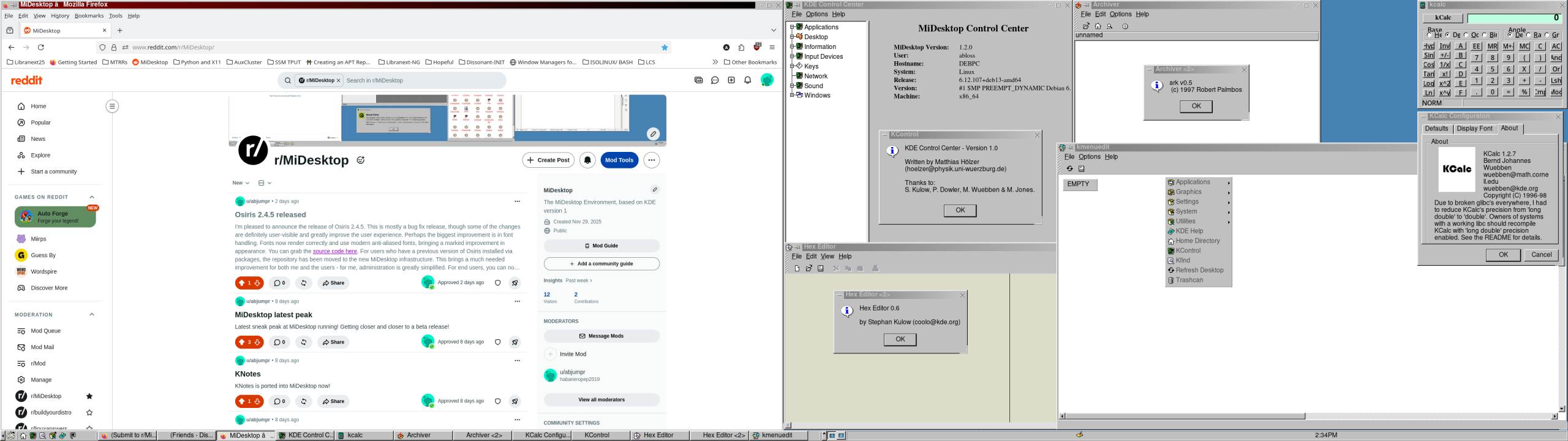
MiDesktop (formerly MiDE) is a fork of KDE version 1, fixed for modern Linux systems. It’s been ported to the Osiris toolkit, itself a fork of Qt 2.
It’s clean, unassuming, and stupidly fast and lightweight.
MiDesktop is under active development. You can get packages for Debian 13 and Ubuntu 24.04, or you can also compile from source if your distribution doesn’t have a package. Please note that MiDesktop is only at beta-quality level right now, and as such are likely to contain bugs. Please report bugs that you find so we can make it even better.
Installing packages for Linux
Packages for Debian and Ubuntu are available for the amd64 architecture.
Important: If you have previously compiled and installed Osiris and/or MiDesktop, you must completely remove those installations prior to using these packages.
Also important: If you installed the development preview release packages, you must completely remove those packages and repositories prior to installing the beta release and using its repository.
You can install pre-built packages for MiDesktop for Ubuntu and Debian systems. Currently, packages are built for Ubuntu 24.04 and Debian 13 amd64. As time allows, packages may be built for more systems.
As of September 2026, the package repositories moved and are unified – meaning, one repository provides both Osiris and MiDesktop, making installation easier.
Important note if you’ve installed MiDesktop from the pre-release development preview packages: You need to remove the old MiDesktop packages and repositories BEFORE you add the new repositories and install the newer MiDesktop packages. Again, you must remove the old packages AND repositories before you continue with these instructions. You’ll run into issues if you do not.
Instructions
You may need to run the following commands as root or using sudo.
Be sure to replace <distro> with Ubuntu or Debian, as appropriate. Same goes for <codename>, replace with trixie (for Debian) or noble (for Ubuntu).
There are three components you can choose from: stable, testing, and nightly. In order to use the MiDesktop beta, you should have both stable and testing enabled, which is why the instructions below have both. Once a stable version of MiDesktop is released, you can remove testing if you desire and stay on the stable branch.
If you wish to use the bleeding edge development releases, you can add nightly as well, however, know that it’s more likely to have bugs or other issues.
Get the package signing key
wget https://pkg.midesk.top/<distro>/pool/stable/m/midesktop-archive-keyring/midesktop-archive-keyring_1.0.0-1_all.deb

dpkg -i midesktop-archive-keyring_1.0.0-1_all.deb

echo 'deb [signed-by=/usr/share/keyrings/midesktop.pgp] https://pkg.midesk.top/<distro> <codename> stable testing' > /etc/apt/sources.list.d/midesktop.list

apt update
Installing MiDesktop
To get the full desktop environment, simply run apt install midesktop-full
For all distributions:
After installing the packages in the previous steps, it is strongly recommended that you reboot your computer. Then, at your next login, you can choose the MiDesktop session and log in. Have fun!
In case of any issues, please check here for known issues and some workarounds.
Getting Support/Finding the Community
We have a Discord channel, as well as a Reddit group.
Supporting the Project
There are several ways you can support this project! The first and foremost is simply using MiDesktop, reporting bugs, and spreading the word. Code contributions are always welcome.
Since many have asked to donate, I have also decided to accept donations for the project. They are greatly appreciated, and will go towards helping further develop MiDesktop, including helping me spend more time on it, as well as the occasional hired developer to move things along faster.
You can donate one of two ways right now: Patreon or PayPal. If you wish to use Patreon, you can either subscribe monthly, or you can subscribe and then cancel your subscription right away so you don’t continuously pay. PayPal is available as a convenience for those who wish to use. Any donations are helpful and I am incredibly grateful to anyone wishing to support this project.
Screenshots